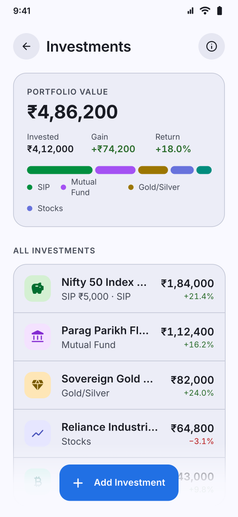
Consolidate all your investments alongside your day-to-day accounts for a complete view of your wealth:
- Diverse Asset Support: Track existing holdings or log new assets across a wide range of categories:
- Mutual Funds and SIPs: Equity, debt, index, and flexi-cap mutual funds.
- Stocks and Equities: Individual shares and market holdings.
- ETFs and Bonds: Exchange-traded funds, government bonds, and corporate debentures.
- Fixed Deposits (FD) and Recurring Deposits (RD): Guaranteed-return bank and post office deposits.
- Gold and Precious Metals: Digital gold, sovereign gold bonds (SGB), and physical gold.
- Real Estate and Property: Land, residential, and commercial investments.
- Crypto and Web3 Assets: Cryptocurrencies and digital tokens.
- Collectibles and Custom Assets: Art, watches, vintage items, and other bespoke holdings.
- Gain and Loss Tracking: Enter the current value of each holding whenever you like, and Kuber works out your total portfolio value, invested amount, gain or loss and percentage return from the values you enter. Kuber is offline, so it never fetches market prices.
- Automated Monthly SIP Deductions: Set up recurring SIP investments with automated account debits on your preferred day of the month (days 1 to 28).
- Visual Asset Allocation: View an immediate breakdown of your portfolio across asset classes to ensure your target risk profile stays balanced.
- Folio Notes and Investment Details: Store folio numbers, broker references, maturity dates, and personal investment theses inside individual notes.
- Private and Offline: Keep your complete net worth and portfolio allocation private on your phone without linking credentials or sharing data with aggregators.