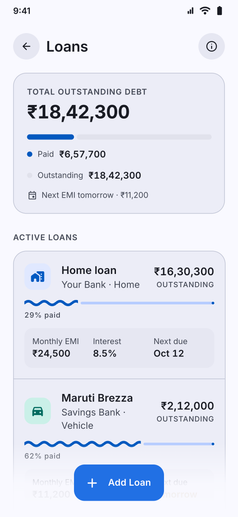
Keep full control over your borrowings, EMI timelines, and outstanding balances in one organized dashboard:
- Support for All Loan Types: Manage any kind of loan structure with dedicated categorization:
- Home Loans: Long-term housing and mortgage loans.
- Vehicle Loans: Car, bike, and EV financing.
- Personal Loans: Unsecured bank loans and personal lines of credit.
- Education Loans: Tuition, college, and study financing.
- Other Custom Loans: Business financing, equipment loans, or private agreements.
- Automated EMI Deductions: Enable automatic EMI logging on your designated bill date (days 1 to 28), debiting the linked bank account and tagging payments under the Loan EMI category.
- Comprehensive Loan Details:
- Lender Information: Keep the bank or institution name clearly visible.
- Reference and Account Numbers: Save your loan account number or sanction reference for quick lookup.
- Interest Rates and Types: Track fixed or floating interest rates per annum alongside principal amounts.
- Repayment Horizons: Monitor start dates, bill dates, and projected completion dates.
- Visual Debt Dashboard: Monitor total outstanding debt, total amount paid, percentage cleared, and next scheduled EMI dates across all active loans.
- Reminders and Timeline Integration: Upcoming EMI due dates feed directly into your device notifications and the Upcoming Events timeline so you never miss an installment.
- Notes and Loan Closure: Record notes for prepayment terms or sanction details, and mark loans as completed once the balance is cleared.