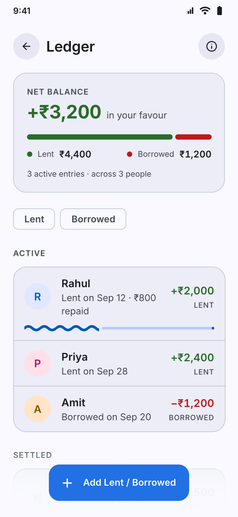
Keep peer-to-peer debts, shared expenses, and informal loans clear without awkward guesswork or forgotten balances:
- Two-Way Ledger: Record both sides of personal transactions:
- Lent: Money you have given to friends, family, or colleagues that you will receive back.
- Borrowed: Money you have taken or owe to someone else that you need to return.
- Smart Contact Suggestions: As you type a person’s name, Kuber automatically suggests contacts from your previous ledger records. Suggestions display past history, whether previous balances are settled, and remaining amounts, saving you from re-typing names or creating duplicate contacts.
- Duplicate Entry Warnings: Kuber warns you if an unsettled ledger entry already exists for a contact, helping you prevent accidental double-entries.
- Net Position Summary: An overview card instantly calculates your overall net standing: total money you will receive versus total money you owe, highlighting whether your net position is in your favour.
- Partial Repayments and One-Tap Settlement: Track partial payments over time with progress indicators (such as percentage received or remaining balance), and mark entries settled with a single tap once squared up.
- Due Dates and Reminders: Attach expected settlement dates to feed into Upcoming Events and system notifications for timely follow-ups.
- Account Integration and Notes: Link ledger entries to your bank or cash accounts, and keep contextual notes on what the money was lent or borrowed for.