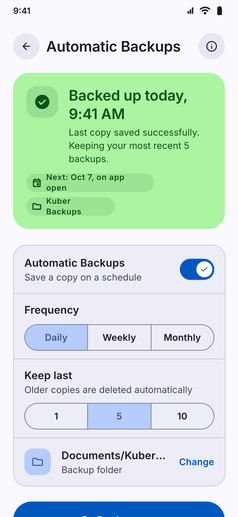
Keep your financial data protected and always up to date without lifting a finger:
- Scheduled On-Device Copies: Automatically create fresh backups in the background on your chosen schedule: Daily, Weekly, or Monthly.
- Custom Destination Folder: Choose exactly where backup files are saved on your phone (such as
Download / Kuberor your chosen storage directory). - Smart Retention Limits: Keep your storage tidy by retaining the last 1, 5, or 10 backups, with older versions pruned automatically.
- Instant Manual Backups: Run an immediate backup anytime with a single tap or let the automated scheduler run quietly in the background.
- Zero Cloud, Total Privacy: Your backups remain 100% on your device. Kuber has no cloud servers and no access to your exported files.