Mode
Accent

Saved on this device only. In the app, Kuber Signature is free and the other fifteen come with Pro.

Menu
ChangelogPrivacy PolicyGitHub
Get the app on Google Play

Privacy Mode

Hide amounts at a glance when others are around.

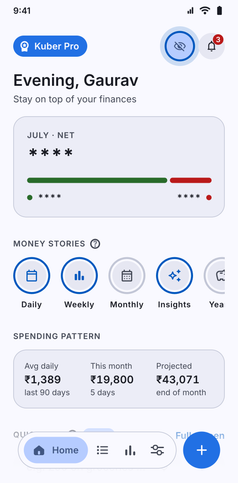
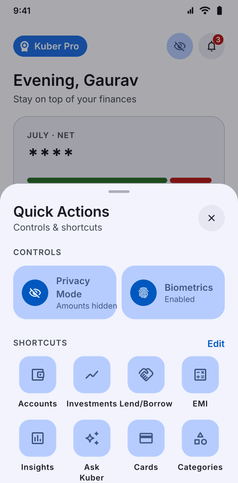
Privacy Mode screenshot: Home with privacy mode on and every amount hiddenPrivacy Mode screenshot: Quick Actions sheet with the Privacy Mode tile switched on

Conceal your financial figures in an instant with Kuber Privacy Mode:

  • One-Tap Instant Masking: Tap the eye icon in the top header on your Home tab to replace balances, income, expenses, and daily averages with asterisks (****).
  • Shoulder-Surfer Protection: Safely open the app in crowded public spaces, coffee shops, or public transit without revealing sensitive account balances.
  • Persistent Local State: Your privacy preference stays active as you navigate between screens until you choose to reveal numbers again.
  • Zero Cloud, Total Privacy: Masking is handled purely in the local UI presentation layer without altering your underlying financial records.
App navigation

Where to find Privacy Mode

Follow any of these navigation paths inside the Kuber Android app:

Option 1Home screen quick toggle
  1. Home tab
  2. Tap Eye icon at top right
Instantly masks all amounts
Option 2In-app search
  1. More tab
  2. Search icon
  3. Type "Privacy"