Mode
Accent

Saved on this device only. In the app, Kuber Signature is free and the other fifteen come with Pro.

Menu
ChangelogPrivacy PolicyGitHub
Get the app on Google Play

Biometric Lock

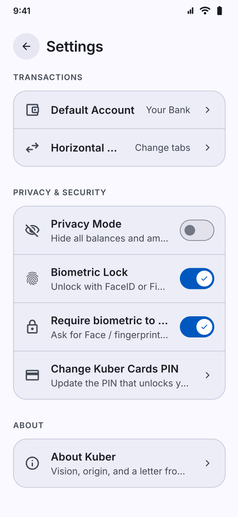
Lock Kuber, private notes and saved cards behind fingerprint or face unlock, secured by your phone.

Biometric Lock screenshot: Privacy and security settings with Biometric Lock switched on

Lock Kuber and sensitive financial sections behind your device hardware authentication:

  • Fingerprint and Face Unlock: Secure your finances with biometric sensors built into your smartphone for rapid, friction-free access.
  • App-Wide or Section Locks: Require authentication when opening the app, or gate specific sensitive tools such as Kuber Notes and Kuber Cards.
  • Hardware-Level Keystore: Powered directly by Android BiometricPrompt APIs and secure hardware enclaves.
  • Zero Exposure: Biometric templates never enter the application. Authentication is handled entirely by your operating system, keeping your identity private.
App navigation

Where to find Biometric Lock

Follow any of these navigation paths inside the Kuber Android app:

Option 1Direct menu
  1. More tab
  2. Settings
  3. Biometric Lock
Under the Security section
Option 2Notes protection
  1. More tab
  2. Notes
  3. Lock icon
Protect private calculation notes
Option 3In-app search
  1. More tab
  2. Search icon
  3. Type "Biometric"