Speed up your daily workflow with two distinct long-press shortcut systems:
1. Quick Actions (Long Press Any Tab)
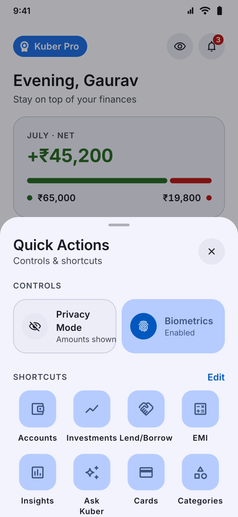
Long-press on any tab in the bottom navigation bar (Home, History, Analytics, or More) to reveal a dedicated quick controls hub:
- Instant Controls: Quickly toggle Privacy Mode (mask or reveal balances) and Biometrics lock on the fly without digging into Settings.
- Customizable Shortcuts Grid: Jump directly to your favorite tools such as Accounts, Investments, Lend/Borrow, EMI Calculator, Insights, Ask Kuber, Kuber Cards, or Categories.
- Personalized Layout: Tap “Edit” to choose exactly which feature shortcuts appear in the grid.
2. Add New Additions (Long Press the + Button)
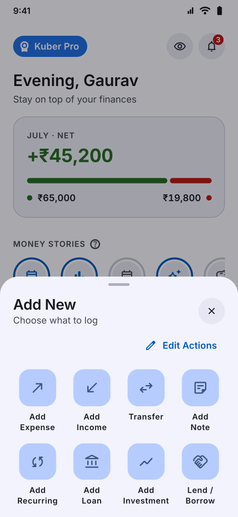
While a regular tap on the floating action button (+) opens standard transaction logging, long-pressing the button unlocks quick entry for everything else:
- Comprehensive Creation Options: Instantly create an Expense, Income, Transfer, Note, Recurring transaction, Loan, Investment, or Lend/Borrow entry.
- Fully Customizable: Rearrange and curate which addition options appear so your frequent logging workflows stay front and center.