Mode
Accent

Saved on this device only. In the app, Kuber Signature is free and the other fifteen come with Pro.

Menu
ChangelogPrivacy PolicyGitHub
Get the app on Google Play

Quick Add

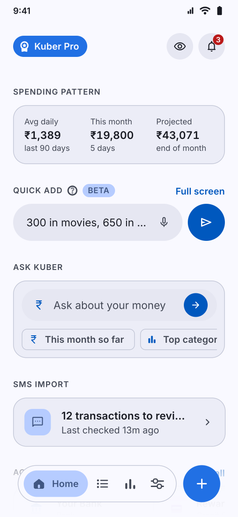
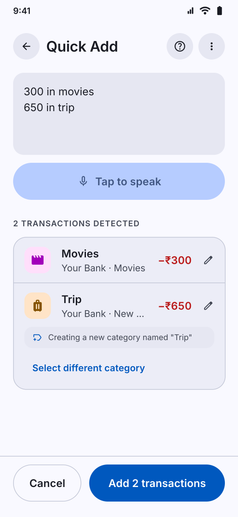
Type or speak to log several transactions at once. Amounts, merchants and categories are parsed on your phone, from the home widget or full screen.

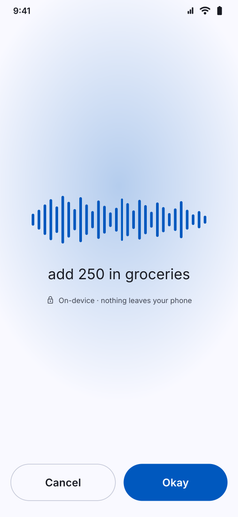
Quick Add screenshot: Quick Add widget on Home with two transactions typed in one lineQuick Add screenshot: Quick Add detecting two transactions, Movies and a new Trip categoryQuick Add screenshot: Voice Quick Add listening, with the spoken words shown as text

Log expenses in seconds by typing or speaking in plain language:

  • Home Feed Widget: Enter transactions directly from the home tab widget or jump into full-screen mode anytime.
  • Multi-Line Parsing: Type multiple entries at once (e.g. 300 in movies and 650 in trip). Kuber detects each amount and assigns or suggests new categories automatically.
  • On-Device Voice Add: Tap to speak naturally. Speech processing runs locally on your device with complete privacy.
App navigation

Where to find Quick Add

Follow any of these navigation paths inside the Kuber Android app:

Option 1Home widget
  1. Home tab
  2. Quick Add widget
Available directly on home feed
Option 2Direct menu
  1. More tab
  2. Quick Add
Option 3App shortcut
  1. Android Home Screen
  2. Long press Kuber icon
  3. Quick Add