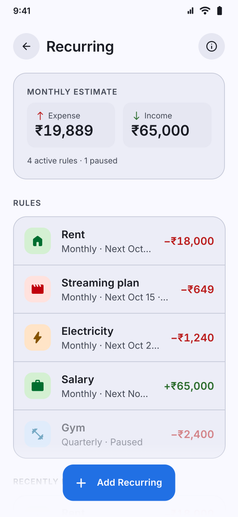
Automate your regular cash flow and keep your records completely up to date without daily manual logging:
- Automated Inflows and Outflows: Set up recurring rules for regular credits (monthly salary, freelancing retainers, rental income) or regular debits (Netflix subscriptions, gym memberships, house rent, utility bills).
- Flexible Recurrence Frequencies: Choose schedules that match your obligations:
- Standard Intervals: Daily, weekly, bi-weekly, monthly, or yearly.
- Custom Day Cycles: Specify exact custom intervals (such as every 45 days).
- Monthly Net Cash Flow at a Glance: The dedicated overview card shows your net monthly recurring balance (total monthly income minus recurring expenses) and alerts you to upcoming charges due in the next few days.
- Background Auto-Execution: Kuber automatically logs the transaction when the due date arrives, crediting or debiting the selected bank account or card with the correct category.
- End Conditions and Lifespans: Keep rules active indefinitely, or automatically stop them after a set number of occurrences or on a specific end date.
- Pause and Resume Any Time: Temporarily halt rules (like a paused gym membership) without deleting them, preserving your setup until you are ready to resume.
- Connected to Upcoming Events: Recurring rules feed seamlessly into the Upcoming Events calendar and widget, so you always know when your next debit or salary credit is approaching.