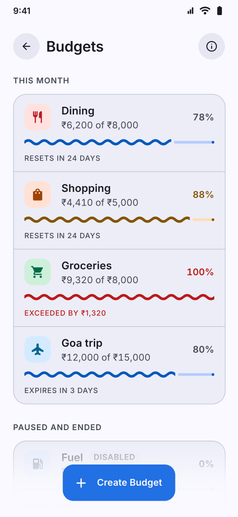
Plan your monthly spending and avoid overshooting category limits with clear progress indicators and timely alerts:
- Category Spending Limits: Create custom budget caps for specific expense categories such as Groceries, Dining Out, Entertainment, Shopping, or Utilities.
- Live Progress Tracking: Watch live progress bars fill up with every logged expense, showing total spent, remaining allowance, and days left in the billing period.
- Custom Alert Thresholds: Set up warnings at key milestones (like 50%, 80%, or 100% of your limit) or custom monetary amounts to receive notifications before you overspend.
- Recurring Monthly Plans: Budgets automatically reset and roll over at the start of each month, or can be configured for custom date spans.
- Budget History and Cycles: Review past monthly performance in the history sheet to see where spending stays disciplined and where limits need tuning.
- Pause or Resume Anytime: Temporarily pause a budget (for example during holidays or travel) without deleting its historical records.
- Home Feed Widget: Keep your active budgets front and center by enabling the Budgets widget directly on your dashboard.