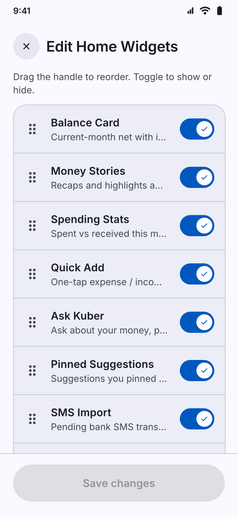
Build an app layout that fits your routine by customizing the widgets on your Home and Analytics screens:
- Dual-Scope Customization: Tailor both your main Home dashboard and your Analytics tab independently, ensuring you only see the information you care about.
- Toggle Visibility: Turn individual widgets on or off with simple switches. Hide cards you do not use to keep your feed clean and distraction-free.
- Drag-and-Drop Reordering: Grab the handle next to any widget to reorder cards instantly. Keep your balance, quick add, or stories at the top, and move secondary insights lower down.
- Rich Widget Library:
- Home Dashboard: Balance Card, Money Stories, Spending Stats, Quick Add, Ask Kuber, SMS Import, Bank Accounts, and Income & Expense overviews.
- Analytics Tab: Monthly income vs expense charts, average weekly heatmaps, category donut graphs, transaction size distributions, and tag-wise analytics.
- Instant Local Preference: Tap “Save changes” and your custom arrangement takes effect immediately, saved completely offline on your device.